When flight time is already quite limited, reducing your battery’s lifespan is the last thing you want to do. It’s easier than you might think to ruin your drone’s batteries, both in-flight and while charging. We’ll focus on proper charging here.
In case you were wondering, damaged batteries do things like:
- Exhibit reduced flight time
- Take longer to charge than usual
- Fail to charge
- Demonstrate drops in power and erratic flight performances
Really badly damaging your battery can lead to things like fires, explosions, hissing noises, and error messages on charging devices that are equipped to provide these.
To avoid these, for starters you really must ensure the following:
- Your charger is the right voltage for your battery
- Your charger provides the right charging current (amperage) for your battery (or watts)
- Your charger is designed for your type of lithium battery
- Your charger automatically stops charging your battery once it’s full (overcharge protection)
- Your charger is capable of balanced charging
Nowadays you may see “smart charging” advertised on battery chargers: this is some combination of any or all of the above. It’s important to check which features are specifically included in this type of advertised intelligence.
Those are pretty much the basics to make sure your battery doesn’t immediately explode. People aren’t kidding when they say to not leave charging drone batteries unattended.
Then there is the Extra Features Section that we’ll go over that covers some additional details of battery chargers:
- Short-circuit protection
- Surge protection
- Over-current protection
- Over-temperature protection
- Under-voltage Protection
- Under-current Protection
- Screen displays
- Portability
But first we’ll start with the basics.
Ensure Your Battery Charger is the Correct Voltage for Your Battery
This is critical but it’s also pretty easy. Drone battery chargers are most often advertised by the type of batteries they’re capable of charging:
- 1S – 3.7 volts
- 2S – 7.4 volts
- 3S – 11.1 volts
- 4S – 14.8 volts
- 5S – 18.5 volts
- 6S – 22.2 volts
It’s more common to see chargers advertised by the “S” rating of the batteries they can charge.
Ensure Your Charger Provides the Right Charging Current (Amperage) for Your Battery (or Watts)
Your battery wants to drink those little electrons one sip at a time. Imagine how it would feel to drink from a fire hose. In a word: damaging.
When you want to know how many amps your charger provides to your battery, look for its “output” value if nothing else specific is indicated.
When you buy a drone battery it will often come with a datasheet that specifies exactly what amperage you should charge it at. If you charge below the recommended amperage nothing bad will happen; it will just take longer to charge. If your battery says to charge it at 1 amp (1,000 mA), and instead you charge it at 0.5 amps (500 mA), then your battery will take twice as long to charge. But it won’t be damaged.
On the other hand, if your battery says to charge it at 1 amp and you charge it at 2 amps (2,000 mA), then you will be damaging your battery.
In case your battery doesn’t specify a charging amperage, it’s generally safe to charge your lithium-based battery at 1C of its milliamp hour value (see battery “C” rating).
For example:
- A battery that’s 1,000 mAh has a 1C rating of 1,000 mA (or 1 amp)
- A battery that’s 2,000 mAh has a 1C rating of 2,000 mA (or 2 amps)
- A battery that’s 2,500 mAh has a 1C rating of 2,500 mA (or 2.5 amps)
- A battery that’s 3,000 mAh has a 1C rating of 3,000 mA (or 3 amps)
If for some reason your battery’s power-to-time ratio is listed in watts (or milliwatts) instead of milliamp hours or amp hours, then just keep this current equation in mind: I = P/V
- I is current (milliamps or amps)
- P is power (milliwatts or watts)
- V is voltage (volts)
To convert between your battery’s watts and amps you’ll need to use the “S” voltage value that corresponds to your battery (listed above).
So if you do the math, a 2S battery (7.4 volts) that’s advertised as 7.4 Wh (watt hours) will yield the following amps:
- I = P/V
- I = 7.4Wh/7.4v
- I = 1 amp (1,000 mA)
- You should charge this battery with a maximum 1 amp of current
A 4S battery (14.8 volts) that’s specified as 29.6 Wh (watt hours) will yield the following amps:
- I = P/V
- I = 29.6 Wh/14.8v
- I = 2 amps (2,000 mA)
- You should charge this battery with a maximum of 2 amps of current
To reiterate, it’s most common for batteries to specify their recharging current in terms of milliamps or amps. The watts and milliwatts listed here are just in case your battery is only described by its milliwatt-hour or watt-hour rating.
Ensure Your Charger is Designed for Your Type of Lithium Battery
The two most common types of drone batteries you’ll see on the market are:
- Lithium-Ion (li-ion)
- Lithium-Polymer (li-po)
It’s important your battery charger specifies it’s designed to charge your type of lithium battery. It should specify this detail clearly. In case you come across a different type of lithium battery, like Lithium-Iron (LiFe), it’s still necessary that your charger specifies it’s designed for this specific type of battery.
Ensure Your Charger Automatically Stops Charging Your Battery Once It’s Full
The way battery charging works is your charger pumps in electrons at a higher voltage than your battery is advertised for.
Think of it this way: if you want to blow up a balloon, if you don’t blow at a higher pressure than what’s already in your balloon, nothing will happen. However, if you don’t know when to stop, then your balloon is going to pop.
The most minimally qualified battery charger should be able to detect when your battery is fully charged, and automatically cease charging.
This is called charge termination. It might also be advertised as
- Over-voltage protection
- Voltage cut-off
- Overcharge protection
- Overload protection
- Over-current protection
Ensure Your Charger is Capable of Balanced Charging
It’s very common for drone battery chargers to clearly state that they support balanced charging. This may also be referred to as “cell protection” or something similar. In these cases you don’t need to think anything more about this.
If you want to get into battery charging theory you’ll find certain obstacles arise when you charge batteries in series. Remember the “S” rating of a battery stands for “series”. Any battery above a 1S (that is, 2S-6S) is considered being a string of 3.7-volt battery cells in series. If you’re using a 1S battery then you can skip this section.
In case you’re curious to know more about this topic, cell protection has to do with overcoming the limitations you get when you charge multiple battery cells that are in series. When you arrange your charger and cells in strict series, the first cell has a tendency to get bombarded with relatively high voltage, that mostly cascades to the next cell, that mostly cascades to the next cell, and so on, until you reach the final cell, which gets diminishingly little voltage for it to charge. Remember, ideally all battery cells will be charged with the same amount of voltage to ensure they’re all charged evenly.
Here’s a graphic of the problems that come up when you have a charger without balanced charging, versus a charger that includes balanced charging/cell protection (example for a 6S battery):
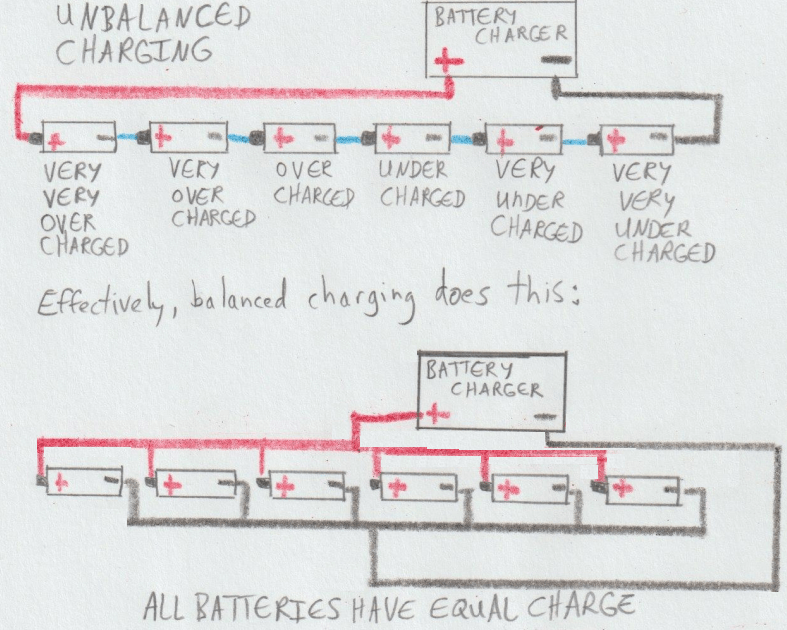
Balanced charging ensures that all battery cells are charged with the same voltage level, and thus end up being charged evenly. Battery chargers with a balanced charging feature do this automatically.
Extra Features Section
Did you ever test the strength of a 9 volt battery by sticking your tongue on its terminals? If it had some juice in it then your tongue felt a tingle. If you put a piece of thin aluminum foil across the 9v terminals it will turn white-hot before vaporizing. Don’t try a paperclip, because you might get it to turn red-hot and really burn yourself, if not also causing the battery to heat/melt, pop, and/or out-gas.
These are all examples of what happens when you short a battery. And shorting your expensive drone battery is the last thing you want to do, accidentally or not.
Many battery chargers are hip to this, and offer variations on this theme like:
- Short-circuit protection
- Surge protection
- Over-current protection
- Over-temperature protection
Because it’s not uncommon for well-intentioned drone enthusiasts to accidentally short their battery terminals when attempting to charge, many battery chargers will have safety measures built in to prevent this. This is in the form of a physical or electronic fuse that disconnects the battery charger if any of these four (or basically two: short-circuit protection, surge protection, and over-current protection are all basically the same thing) anomalies are detected.
Under-Voltage Protection, Under-Current Protection
This “feature” is at most a diagnostic, and probably also a sales gimmick. Your battery can’t be damaged if it’s charged “under-voltage” or “under-current”.
In the case that it’s charged “under-voltage”, your battery simply won’t be charged, or won’t be fully charged.
If it’s charged “under-current” it just might take longer to charge, but that doesn’t necessarily mean there’s a problem.
If your battery charger does have such a feature and the error light goes off, this likely indicates that your battery may have a problem and is possibly damaged.
If it’s indicating “under voltage” this might mean your battery is getting old or was damaged.
If it’s indicating “under current” but still eventually indicates your battery is charged, give it a test flight and see if you notice anything abnormal. In the worst case your battery is getting old or is damaged. If you don’t notice anything abnormal after a few test flights you can probably ignore this warning. It may simply be indicating that your battery isn’t being charged as fast as possible, but there’s no damage that can result from this.
Displays and Portability
Many of the features discussed on this page may be displayed on a battery charger’s monitor screen. This is getting into the more high-end territory, but it does provide an extra level of understanding of what’s going on beneath the surface of your charger.
When it comes to portability, in addition to battery chargers you plug in at home, it’s also fairly common to come across units that feature plug-in adapters for vehicles that are commonly rated at 12 volts and 5 volts.
 DIY Drone Guy